Showing posts with label Technology. Show all posts

Thursday, January 19, 2023

Can ChatGPT be used for teaching critical thinking and informal logical fallacies?

It's been a while since I last wrote a blog post, but with all the recent media attention (and my own interest), I thought it would be interesting to share some of my results in using ChatGPT. Specifically, using it to replicate the things that this blog, a book and podcast did regularly, back when blogs were big and podcasts were small.


What is ChatGPT and how could it assist in teaching critical thinking and analysing arguments?

Unless you've been a participant in the series 'Alone' since December last year, you've probably heard about ChatGPT, the cutting-edge language model developed by OpenAI that utilises deep learning techniques to generate human-like text. The recently media attention has highlighted its potential to revolutionise various industries and applications, including education. While there are plenty of potential challenges of AI in education, an interesting application of this technology is its potential to help teach critical thinking, informal logical fallacies, and how to analysise/improve arguments.

ChatGPT can be used to generate realistic examples of common logical fallacies and explain where the argument goes wrong. This can help students develop the skills necessary to recognize and avoid these fallacies in their own arguments and in the arguments of others. For example, it can generate a statement like "Vaccines cause autism" which is (sadly) a common logical fallacy called False Cause

Additionally, ChatGPT can be used to analyse and evaluate arguments by generating counterarguments and identifying any weak points in the reasoning. For example, it can be used to evaluate an argument in favor of increasing the minimum wage, by generating counterarguments such as "increase in minimum wage would lead to inflation" or "small businesses would suffer" and help students identify any weak points in the reasoning.

You can also use ChatGPT to facilitate discussions and debates by generating thought-provoking questions and prompts. For example, it can generate a question like "Should the government regulate social media to combat misinformation?" this can help students to consider different perspectives and to develop their own critical thinking skills.

Overall, ChatGPT has the potential to be a valuable tool for teaching critical thinking, informal logical fallacies and to analyse people's arguments. Despite concerns about the potential challenges of AI in education, the technology holds a lot of potential in various fields. As the technology continues to improve, it will likely become an even more powerful tool for educators and students alike.

Hopefully anyone who has played around with ChatGPT has reaslised by now that most the above is a copy and paste from ChatGPT. It's too well written to be me (and it's kind of boring and lacks my use of irony or references to TV shows). 

See below for my initial few prompts and its response.
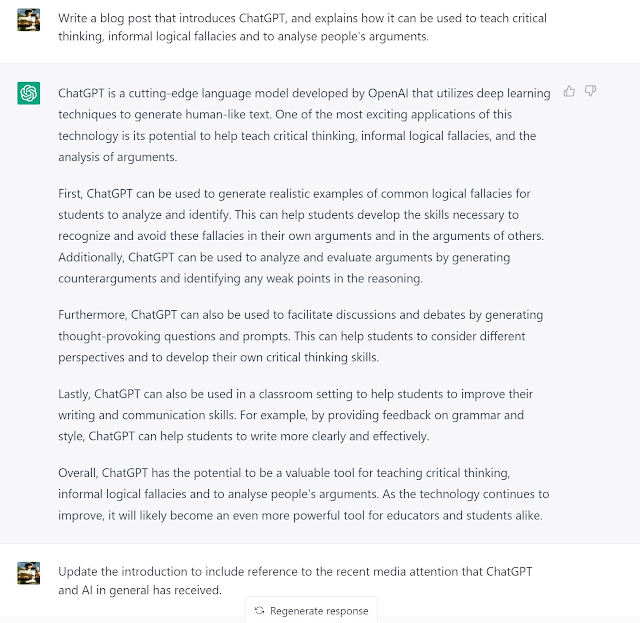

Using ChatGPT to generate an explanation for concept, such as an informal logical fallacy.

My next step was to get it to explain a fallacy.


As Larry David would say, pretty, pretty, good. 


Using ChatGPT to analyse an argument.

I then decided to see how it would go assisting me in analysing text for fallacies, which is pretty much the entirety of this blog. So I tested ChatGPT against some text from this post: No conflict here, just scientists doing their jobs - you know - science


Okay, I told it to look for a particular fallacy. So how about just looking for them in general?

And then again for another bit of text from the blog post:

It's certainly not perfect, and I've found other examples when ChatGPT is completely wrong, but as an assistant and teaching tool it already has a lot of potential. Just as with Wikipedia for doing research, a good starting point for a topic or constructing (or destructing) an argument, but not an endpoint.  
We said in the introduction to Humbug!, that the book: 
...is more a tool to consult as the occasion demands, rather than a book to read in a linear fashion. You may find it to be a useful resource for those occasions when you read or hear a suspect statement or claim, and want to identify the flawed reasoning in the assertion.
If I ever do a 3rd Edition I'd probably update this point to suggest running the suspect statement or claim through ChatGPT or an equivalent AI, and then checking its output against an authoritative source. Speaking of which (and as an aside) I just realised that according to Betteridge's law and my headline, all of the above is wrong.

Monday, September 03, 2012

Online security and password management

This post is a bit off topic from what I usually write about. I want to take look at a something that is increasingly becoming an issue - being secure online. The internet is an essential utility that one cannot avoid. As such it’s more important than ever to have good security hygiene.

Background

Wired journalist Mat Honan was recently hacked hard. Hackers gained access to his Apple iCloud, Twitter and Google accounts. They posted some vile comments via his Twitter, deleted his Google account, and wiped his iPhone, iPad and MacBook Air. His MacBook air was the only place he had more than a year’s worth of photos, covering the entire lifespan of his daughter. (He's since recovered his data, at a cost of about $1500.) Really, he was lucky in that they did this for the “lulz”, not to gain access to a bank account or steal his identity.

There is no such thing as perfect security when online, but you can take steps to be more secure. Before looking at solutions, let's consider the issues.

Authenticating yourself involves providing evidence that you are you. You can prove who you are through:
  • something you are (e.g. a finger print)
  • something you know (e.g. a password)
  • something you have (e.g. a mobile phone).
Logging on to a website generally uses "something you know" - a password. The problem with this is that this is inherently insecure. If a hacker gains access to your password - game over.

I've spent a fair bit of time getting secure as reasonable. The main ways of doing this are:
  1. Using strong passwords
  2. Two factor authentication
This post will take you through some apps that make it easy to do this with hopefully not too much effort. It is more effort than not being secure, but much less effort than trying to recover a destroyed digital life, or worse, a stolen identity.

What to not do

Most people use terrible passwords. The most common passwords are:
  1. password
  2. 123456
  3. 12345678
  4. 1234
  5. qwerty
  6. 12345
  7. dragon
  8. pussy
  9. baseball
  10. football
  11. letmein
  12. monkey
  13. 696969
  14. abc123
  15. mustang
  16. michael
  17. shadow
  18. master
  19. jennifer
  20. 111111
  21. 2000
  22. jordan
  23. superman
  24. harley
  25. 1234567
If one of yours is here... sheesh. (And one assumes number 8 is referring to the popular house pet.)

Some basics of things you shouldn't do. Do not use:
  • personal information in your password that someone could work out
  • dictionary words, or geographical or biographical names
  • a password that is the same as your account information.
If you think you're okay because you use an "un-guessable" password of your own, think again. If your password isn't actually random, then it's getting worse over time. Every time a password database is leaked, hackers get a better idea of the patterns that people use, as this great article explains. Other points:

  • The average Web user maintains 25 separate accounts but uses just 6.5 passwords to protect them.
  • In the past year alone more than 100 million passwords have been published online.
  • 8.2 billion average passwords combinations per second are able to be tried by a PC running a single AMD Radeon HD7970 GPU.
Passwords people think are secure follow patterns that hackers have cracked. E.g:
  • Adding numbers or non-alphanumeric characters such as "!!!" to them, usually at the end, but sometimes at the beginning.
  • "Mangling" — transforming words such as "super" or "princess" into "sup34" and "prince$$".
  • Mirror imaging — "book" becomes "bookkoob" and "password" becomes "passworddrowssap".
  • Appending a date of birth or similar to a name — Julia1984.
The bottom line is you're not really that clever or original. Any pattern you thought of using, someone else has probably thought of using it too, and at some stage a password database leak has enabled hackers to add that pattern to the lists of passwords they cycle through.

How to create a strong password

The fundamentals of making a password strong are:
  1. A bigger set of characters: numbers only (10 characters), numbers + lowercase + uppercase letters (10 + 26 + 26 = 62 characters), all the characters on your keyboard (92).
  2. The longer the better. Longer means exponentially more possible combinations an attacker has to try. A four character password would take about 0.0004 seconds to crack. A 10 character one would take about a year.
  3. Increase entropy. Use random characters for your passwords.

Friday, August 31, 2012

Digital note taking

Since about 2003 when I got my first PDA (remember these) I've gone all in on paperless (with the exception of proof reading and doing Maths). Mobile computing has been the key to me being organised and able to take legible notes. I've gone through many gadgets. With my iPad and Galaxy Nexus, I've never had it better when it comes to paperless productivity.

One of the most important uses I have for my iPad, phone and laptop is note taking. Depending on the situation, I'll use one or the other (sometimes two at the same time) to take notes in a meeting, or just when I'm out and about and have a thought I want to capture.

I've experimented with many different services and apps for note taking. Over time I've come up with the following criteria that I need in a note taking app:
  • Platform agnostic: It's not locked in to any particular operating system and is available on any device I want to use. In my case, it needs be on iOS, Android and the web.
  • Syncs to the cloud: If I make changes on one device it'll show up on another without any effort on my part.
  • Data portable: It's my information so I should have complete control over it, and be able to leave the service easily.
  • Simple (plain text - at most basic formatting): I've used note taking apps with a fair bit of formatting. What I've found is they tend to be slower and you end up spending too much time mucking about with the formatting. If I need a formatted document, I'll use a word processor or a markdown text editor.
  • "Photo notes": Taking a photo of some information and having it in your notebook is really handy. In the last month I've taken photo notes for the following reasons:
    • where I parked at a multistory car park at the airport
    • my hotel room number
    • the odometer reading on a car for recording in a log book
    • record of receipts
    • whiteboard diagrams
    • someone else's hand written meeting notes (my favourite use...).
  • "Voice notes": Sometimes you can't type a note. Just click the little microphone icon and speak the note.
  • Fast: If you have to pause before capturing an idea, the idea might be gone before you're typing the note in the app. It's essential that whatever app you use, it's as fast as the main competitor - pen and paper.
  • Searchable and easy to organise: Here's one thing that digital is indisputably better at than analogue - categorising and organising information. Search by keyword, tag, title, folder, date, the list goes on... Finding relevant notes is very simple and accurate.
  • Reliable: All of the above is moot if you can't trust your note taking system. It shouldn't ever cause sync conflicts and you definitely do not ever want to lose a note.
  • Looks good: This might seem somewhat trivial, but you're in the app using it all the time. If it's not decent looking the experience won't be enjoyable and you won't take as many notes. I can't stand the faux analogue Apple seems to employ (skeuomorphic design). I prefer my digital apps to look "authentically digital". Each to their own, but this is something to consider.
On reading the above, it should be pretty clear I don't use the default note app on my iPad.

The note taking app/service I use is Catch Notes. It fulfills all the above criteria. There are excellent apps for Android and iOS, and a web app too. It doesn't lock you in. They haven't yet implemented a way of exporting all your notes in one go, but it is in development. You can export them one at a time.

I can be taking notes in a meeting on my iPad, snap a picture of the whiteboard on my Galaxy Nexus, append the picture to the same note using Catch Notes on my phone, have that re-sync and the note on my iPad now includes the picture. I can then go back to my laptop and open up the Catch Notes web app, and have it all there. It's seamless.

Other note taking apps/services I've used and liked are Simple Note and Evernote:
  • Simple Note is great for plain text. It's very quick to open, runs smoothly, the search function is excellent. Catch Notes I'd argue is just as fast and seamless in its syncing, but it also allows you to make audio notes and photo notes.
  • Evernote also does images and audio. However, you can't have complete offline access to your notes on your mobile device with the Evernote free account. Being a cheapskate, I don't want to pay for my note taking solution. Catch Notes also has a paid plan, but you're fine on the free account unless you need to sync 70 MB a month or attach PDFs to a note. One thing Evernote has going for it over Catch is it will OCR images that you upload. I rarely need this, and on the occasion I do, I just use Google Googles.
There are a bunch of other note taking apps/services out there. Microsoft OneNote has a powerful set of features, is now cross-platform and syncs with SkyDrive. It's worth a look too.

My advice is to play around with a few of them for month or two before settling. There will be nuances in the different ways in which they work that won't be immediately obvious. Once you have found something that works, try to stick with it and not do what I've done over the last two years (change between about 6 different methods/apps/services).

Wednesday, June 09, 2010

Fanboyism

Ever since buying an iPad and reading reviews about it, and the associated comments on websites, the almost religious fervor with which people either love Apple or hate it has left me quite bemused. This post at Gizmodo goes through the cognitive biases that allow us to rationalize our choices in brand loyalty (or hating, as the case often is). 


For the record - as listed on my gdgt profile - to date I've owned 2 Windows Mobile PDAs, an ASUS eeepc netbook on which I ran Windows XP and then Ubuntu Linux, and an iPod Touch. I certainly have no brand loyalty. I really only have loyalty to my wallet... The iPad is easily the best mobile computing device I've ever owned.